Main links
The RRR route on a Smartphone - for competitors!
In 2012, I shepherded a late group from Maltby to the Finish in the dark. To my surprise, we were caught by a single walker. I enquired how he had managed to find his way in the dark. Had he recce'd the route? No, never done it before. He was following the route on his mobile phone (Android SmartPhone). He had uploaded the GPS route from this website, and using the MyTrails app was alerted of turns, and could follow the line of the route between waypoints. Extra essentials: Waterproof cover for phone, external battery, practice. Follow link to see detailed information.
Route changes
this year
Travel to Event Centre Public transport Accommodation
Route description (Supporter's cars / Relay co-ordination)
View the route on Google Earth
If you need Adobe Acrobat, click this
button: 
The following links are planned to be updated prior to the
event, when the route is finalised - see summary of changes below for updates in progress.
Text version of
Updates, for Printing (use Right Click, Save As...)
(includes description of changes 2013 to 2001, where still pertinent)
Wainwright
map of changes (as a .pdf file, updated for 2013, the year of recent
significant changes)
or alternatively on
OS Explorer Maps 278 (Sheffield and Barnsley) and 279 (Doncaster)
at a Scale of 1:25000 with a lot more detail, including field boundaries.
Link to Grid References to mark up your map
at Manvers Waterfront Boat Club, Station Road, Wath upon Dearne, Rotherham,
S63 7DG. Start
and Finish, showers & food at finish. Grid Ref SE 442017
Overview of area:
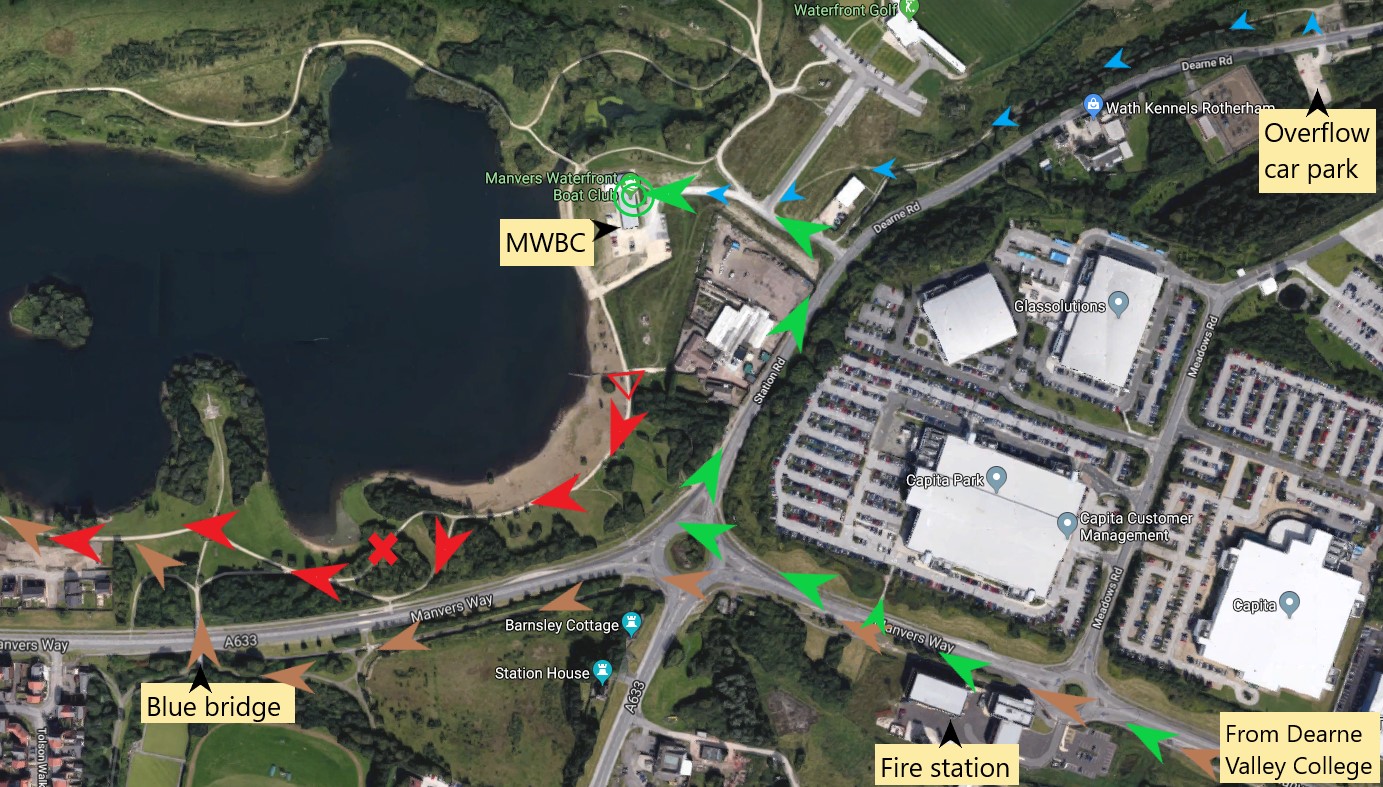
Previous route as brown arrows, new start at red triangle (S of gate), following red arrows - red cross marks a narrow footbridge, best avoided. Finish at green concentric circles at end of green arrows (this is also the access route for vehicles). Small blue arrows show route from overflow car park, possibly a quieter spot for motorhomers! Car parking restrictions don't apply during the event, but do for recce runs.
Navigation files (maps, description, GPS data, etc) await updating.
Link
to Google Map (Note: the marker is on the adjacent golf club).
Click here for .pdf
version to save and print (The picture of the house is spurious!) If you have downloaded one of the
Accommodation and public transport To view the route, using Google Earth.
a) Go to the Google Earth website, download and install Google Earth (requires broadband internet access to operate)
b) Click on this link to the route file (or right click on this link, select 'Save Target As...' and save the file rrr_gps_map_trackpts_kml.kml to a suitable folder, e.g. My Places in My Documents, the default folder for Google Earth). NOTE: Save Target As... seems to think you want to save the file as type .XML - instead change type to 'All Files' at the bottom of the dialogue box.
c) Open Google Earth and File Open the file you saved. You will see the route with start, checkpoints and finish. (start and finish are very close together to the north of the route; route is anti-clockwise) For clarity, it is best to switch roads OFF (untick box).
d) When you exit Google Earth, decline the offer to save unsaved data, or you will get it in duplicate next time.The 2011 route file is available in three formats: path (showing waypoints), track, trackpoints for use with slider
Click here for written description for supporter's cars for route round checkpoints (updated for 2023) with grid references for map users and
(approximate) post codes for the checkpoints to assist SatNav users, checked against TomTom.
map
GPS: OS grid points (updated for 2019, still valid) are all on offer
The 2023 versions of written description and map are now available
We try to specify the route in advance, but late changes
may have to be made, even on the day, if dictated by circumstances.
Note: the emergency telephone number on
your race number, the description and maps is ONLY to be used during the event, if assistance is
requested (e.g. for retirements) and is NOT to be used to ask for further
information about the event before or after the day.
Most information you
require should be available on this website or by email to
Henry Marston
Click on 'I am a human', answer question(s) and then click on
the Show it! button. You should be able to click on the email address to start
an email.
Click on the Back button to go back to the web page
5th October 2024
From Time and date for Rotherham
Sunrise 07:14 Sunset 18:31 for 2024
Dawn Twilight: 06:40 Dusk twilight: 19:06
Navigation aids have been updated for the new Event Centre
Note:
Accordingly there are only been cosmetic changes to the strip maps and
written description of 2024/06/26 (as in the footnote) and later.
They have been updated for the changed emergency number
GPS files have not been changed for 2024.
To assist navigation in the dark, glowsticks are usually put out to assist navigation at selected critical points on the first stage and from Maltby to the Finish on the day of the event. If you see them, they could help, but they don't replace the written description or Wainwright map
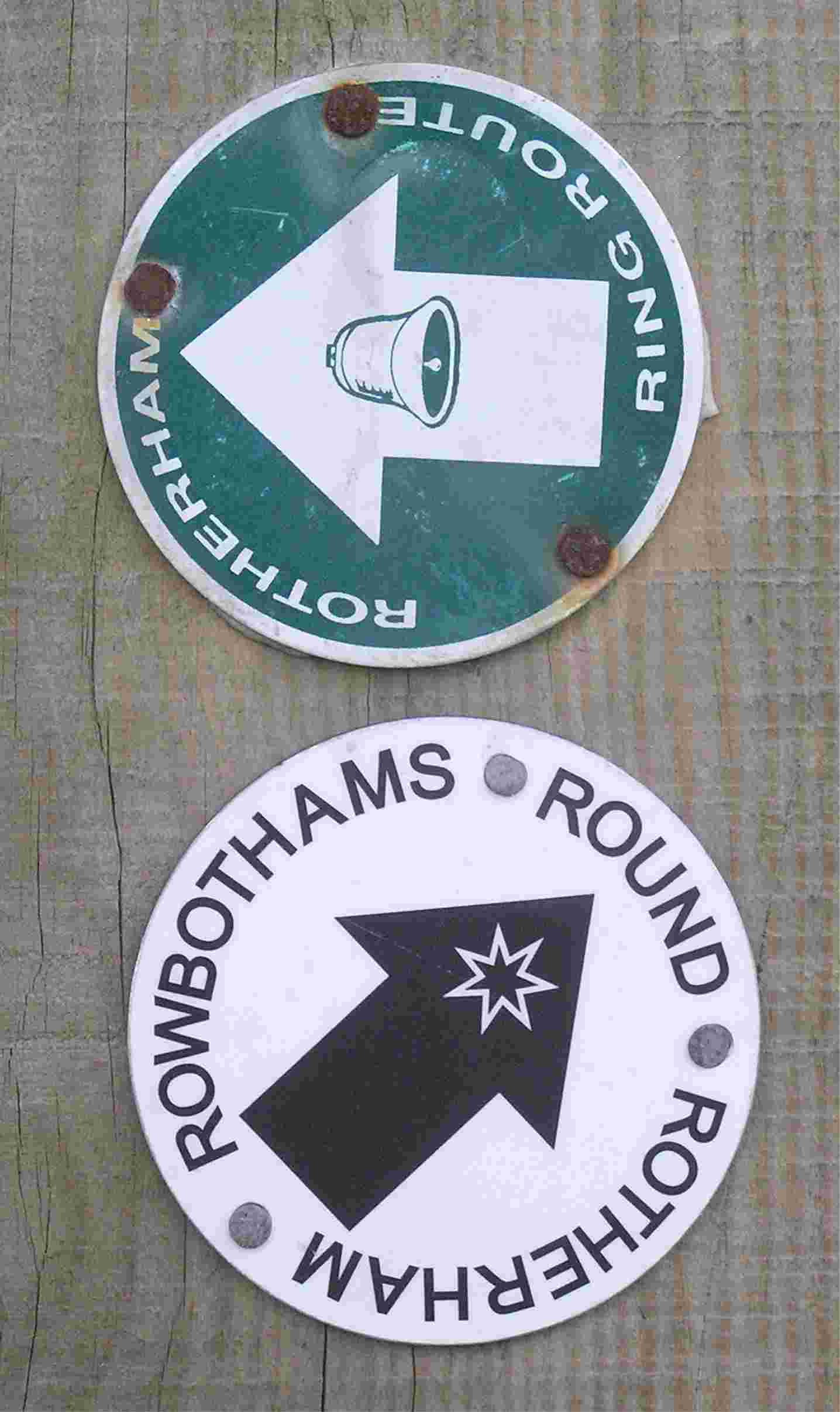
Receipt for confusion:
The Rotherham Ring Route has recently been established, developed and waymarked. The publicity, by the local Ramblers Group, says is based on a route devised by
RHAC, i.e. our Round Rotherham. The two routes coincide over much of the
distance, but there are significant differences, notably near the middle
checkpoint
(we need to get to the Woodsetts check-point to give you refreshments) and near
the start/finish.
The written description and strip map reflect local changes, e.g. displayed
names on warehouses, local landscaping work, so need annual updating.
2.
In the LDWA tradition, a
Written
description, or right
click here and Save Target as ... or Print target (to print it properly)
Be aware that the description
is updated as necessary changes/corrections are identified up to the day
of the event.
3. The "Wainwright-style"
diagrammatic map, or right
click here and Save Target as ... in which the route works UP each sheet,
starting on Strip 1
IF YOU ARE NEW TO THIS TYPE OF EVENT, THE WAINWRIGHT MAP IS
PROBABLY THE EASIEST TRADITIONAL NAVIGATION AID.
Note: the scale is variable, depending on local
detail. To give some indication of scale, the arrows are (approximately) 200 m
long. Short arrows correspond to sections of simple navigation, following
a canal (for example). Long arrows lead you through complex sections, with
numerous twists and turns. GPS marker identifiers are shown in small
yellow
ovals to assist relocation (as described for 2. Written Description, above).
Leading zeros are not used, i.e. the sequence is STA, A1, A2, .... My
suggestion that the waypoint markers should also have these identifiers has not
been supported.
The map is in .pdf format. Warning: 2500 k bytes
This schematic will be available (in colour) as hard copies on the day printed
on normal paper - you need a map bag! (subject
to availability).
Be aware that the map
is updated as necessary changes/corrections are identified up to the week of the
event.
Technical: The map was created using the Lotus Freelance software, now somewhat obsolete, but has now been converted to PowerPoint. In doing so, many tweaks and adjustments have been made, so that although basically the same, there are numerous differences. In particular, there is more consistency in symbols, e.g. line width, and more use of colour. You are recommended to use the new version of the strip map, preferably in colour. It is planned to have colour prints available on the day, subject to availability.
The following have been updated for 2021, still generally valid
4. A schematic map (2 Megabyte) provides an overview of the route on the 111 Landranger OS map and is provided to show the checkpoints, to aid relocation (in the unlikely event of you going astray). Updated for 2019
5. A detailed 1:25000 map (total 6×A4 pages) showing the route, based on GPS data with improved background map quality. Warning: This is a large, 6 Mbyte file - only download if you have a fast connection. Can be printed from Acrobat on A4 and stuck together. (it is best to right click on the link and Save As Target... , especially if you want to print it) (Updated 6-sheet version for 2019 of the 6×A4 page version)
The maps are reproduced from Landranger® Map 111, 1:50000 scale and Explorer® Maps 278 and 279 1:25000 scale by permission of Ordnance Survey® on behalf of The Controller of Her Majesty’s Stationery Office. ©Crown copyright 1974-2002. All rights reserved. Licence number 100047659.
6. List of waypoints as Lat/Long or OSGB of around 170 key points to mark up the route on the OS Maps, viz Landranger Map 111 (Sheffield and Doncaster), 1:50000 scale, or Explorer® Maps 278 (Sheffield and Barnsley) and 279 (Doncaster), 1:25000 scale. The OSGB file gives codes, a 10-figure grid reference and a brief description - or use the straight list, with 6-figure grid reference (currently shows 10-fig GR) (latter updated for 2019)
7.
GPS routes, tracks and waypoints in various
formats for Garmin (inc. Forerunner), Magellan and other GPS brands using inter alia
GPS Utility
To clear your GPS of Round Rotherham waypoints, delete by symbol: Flag (possibly coloured blue, or called golf course)
8. GPS route on a car-type Sat Nav This option is available both for competitors and supporters in cars
If you are driving
round as a supporter, or fellow relay team member, the
For competitors, there is also the possibility of using a car-type SatNav for navigation on the event. Follow this link for a detailed explanation (including comparison of trail and SatNav units).
Keep an eye on this Navigation pages for more information. Obviously, the final GPS route files can only be supplied close to the day when the precise route has been finalised. As always, there are some uncertainties that need resolution.
If you require a different GPS
data format, contact me, Henry Marston
Click on 'I am a human', answer question(s) and then click on
the Show it! button. You should be able to click on the email address to start
an email.
Click on the Back button to go back to the web page
9. The technology solution: Route on your SmartPhone
Please follow the link....
10. The route in pictures. We are building up a set of pictures to show the route as you will see it. So far, we have the new access route from Rotherham, and sections where changes have been implemented (generally) These versions are not easily printed - I plan to create printable versions.
Low-down on the route
Overall: a 50 mile / 81 km undulating mostly rural route, as
measured by GPS. Yes, surprisingly to some, it's mostly rural. The
longest urban section is where we get close to/make short visit to
Sheffield. Overall climb is 800 m from a count of contour lines on
maps, or 1230 m from the GPS track (maybe questionable). For this length of course, a Category C fell race under the aegis of the FRA would have to provide over 1500 m of climb, or 3800 m for category A,
so I'm afraid it's not hilly enough for some!
Stage lengths (updated for 2023)
Based on my GPS records for the actual course,
2015-2018, adjusted for CP7 change to Hooton Roberts. Description Start to Grange Grange to Treeton Treeton to Harthill Harthill to Woodsetts Woodsetts to Firbeck Firbeck to Maltby Maltby to
Hooton Roberts
Hooton Roberts to Finish
The
route in pictures: Access
The
route in pictures: Stage 1 (from Start)
The
route in pictures: Stage 1 - Thorpe Hesley
The
route in pictures: Checkpoint 1
The
route in pictures: Stage 2a Hilltop to River Don
The
route in pictures: Stage 2b Approaching Checkpoint 2
The
route in pictures: Stage 6
The
route in pictures: Stage 7 - part showing changes to the route
The
route in pictures: Stage 8
Stage
length, km
Climb (GPS), m
15.6
308
10.1
170
11.9
196
9.2
123
9.0
86
6.3
108
9.1
130
9.5
108
For 2 person relays, the odd
stage runner gets the 3 long stages, 1, 3 and 7 (total 45.6 km, c.f. 35.1) with most climb. Stage by stage (corresponding to the
relay - individuals enjoy the full experience):
Underfoot conditions vary from stage to stage
Stage 1 (15.6 km) has hard-surfaced paths, road and canal
towpath, unfortunately made good so that there is little risk of sliding
into the canal, to a yard and then somewhat muddy (briefly) through a wood.
Track, road (minor) path through a village, then we have found a muddy
ridge. Then firm. This is the stage with most climb and descent - slightly
undulating to Elsecar, but then climbs and drops through Kings Wood,
Wentworth, Thorpe Hesley and up to Keppel's Column before descending to the
CP. Much of Stage 3 (11.9 km) comprises cycleable paths and tracks. Towards
the end there are a couple of field crossings - muddy or firm, depending on
what ploughing the farmer's done. Route follows the River Rother gently uphill, then
branches off along the Chesterfield Canal past the collapsed Norwood Tunnel
entrance and climing further
tothe Harthill CP,close to the Rotherham County Top
Uphill, with occasional respite (level ground!).
Stage 2 (10.1 km) is mostly firm (the main excitement, when leaving Grange
Park, is now bypassed). Tracks and road, the urban section through Sheffield (Tinsley).
Drop from CP to stream, up and over a ridge to the River Don, then
undulating through established residential areas before new developments
leading to the River Rother
which is followed to the CP .
The first 60% of Stage 4 (9.2 km) is a series of field crossings, then easy
(hard surfaced tracks and road) crossing the Championship Golf Course at Lindrick, and then the hill (climb of 25 m, but runnable by some).
Undulating; 2 climbs, approaching Lindrick Golf Couse and after it, approaching
Woodsetts
Stage 5 (9.0 km) starts muddy (if wet), but from Langold Park it gets firmer. Even
the fields are reasonably firm except at Wallingwells (depending on rain).
Steady climb from
Langold through woods, a drop then short climb to CP
For Stage 6 (6.3 km), the initial route follows field side tracks - can be
sloppy. Firm past Roche Abbey, the valley path afterwards may be sloppy on
the surface but firm beneath, now finishing just after Maltby church.
Undulating, following a rising stream after Roche Abbey, climb then undulating
to Maltby
Stage 7 (9.1 km) starts with road run through Maltby, to a field-side track that can be wet. Short firm
section of road, through village of Micklebring, then 3 km of (sometimes) well-defined field
paths - depending on ploughing - to a track through a hamlet. The
subsequent field path and the path
through the wood can be wet, the latter being (steeply) downhill so let yourself go -
or take it with care, especially after dark. If you leave Maltby after
17:00, you will need a torch/headlight on this section. Undulating, the longest
climb being after Firsby.
Stage 8 (9.5 km) now has a trail section, a steady climb from Hooton Roberts
and then down to the old Old Denaby checkpoint location. Then a road section,
with climb over a railway footbridge leading to a canal towpath, river bank path
leading to a second canal A lit cycle track (replacing a path slipping
into the mire) leads to a roadside cycle track to MWBC.
Thank you if you made a submission for the ROW issue. There was a public enquiry in February 2011 and the path was finally reopened in May 2013
There is a possible access
problem in the section between
Just
before the 2007 event, it was found that a gate had been installed across the
Rotherham
Metro Ramblers reported the obstruction of the path to the Rotherham Rights of
Way Dept who have taken some action by clearing the path and writing to the land
owner.
This is an
important linking section that has been part of the Round Rotherham route since
it was first devised. In the past, it was across derelict land, with
free access. Now that the house has been built, it would help safeguard
the route if this section was established as a Right of Way. For the 2007
event, the new gate was left open for the event. In 2008, it had not
been opened; I think most people climbed it. Clearly, this is not ideal; a
diversion route was specified.
Last update
19 February, 2025 by
web page queries
Click on 'I am a human', answer question(s) and then click on the Show it!
button. You should be able to click on the email address to start an email.
Close the pop-up or click on the Back button to go back to the web page
Quick link to this page: https://tinyurl.com/RRRnav
Take me back to the RRR page, Henry's Home Page